

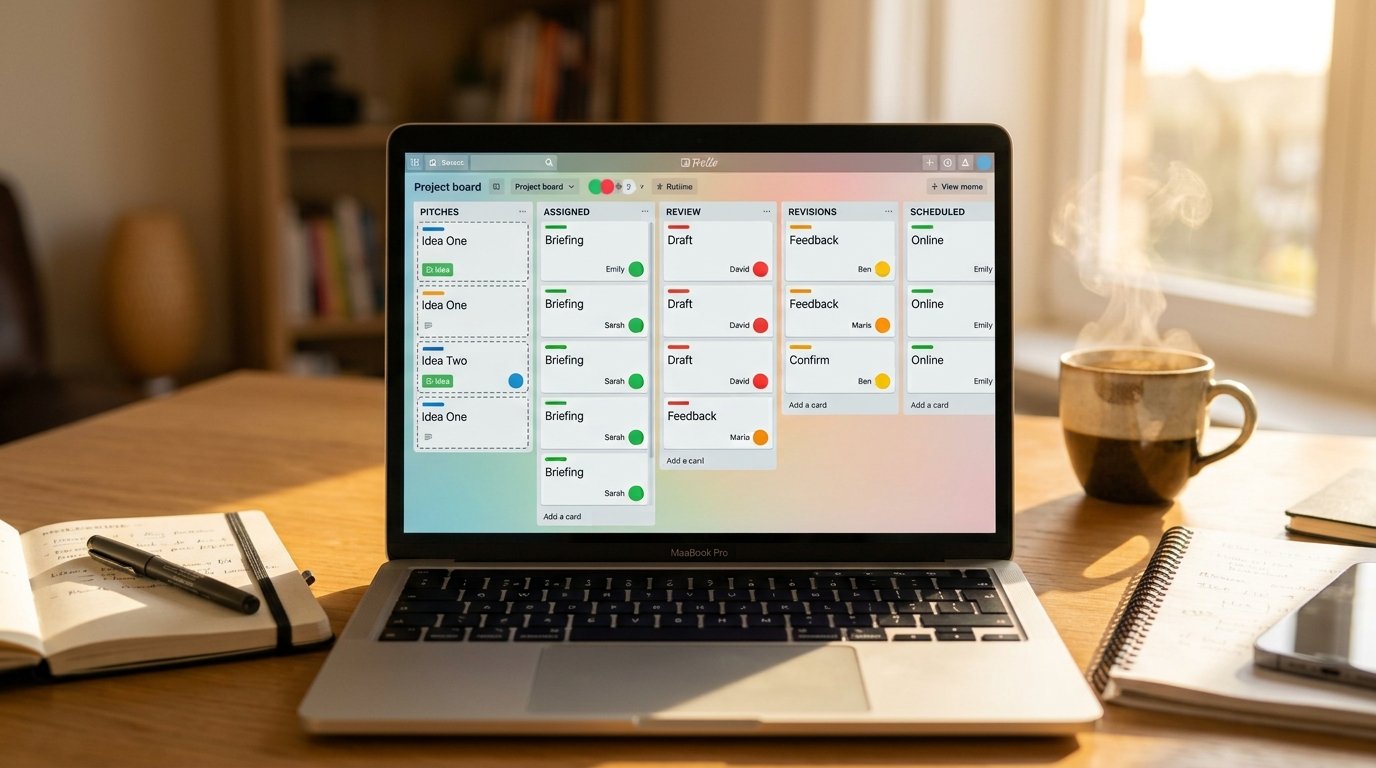
Managing one writer’s content pipeline is straightforward. Managing five, ten, or twenty contributors — each with different deadlines, drafts, and communication styles — is where most blogs start losing track of who’s working on what. A well-structured Trello Kanban board for multi-author blog management solves this by giving every writer, editor, and post a clear, visible place in the same shared system.
This guide walks through exactly how to build that board, including list structure, author tracking, and the automation that keeps a multi-writer blog running smoothly without constant check-ins.
Key Takeaways
- A Trello Kanban board for multi-author blog management needs clear stages, visible author assignment, and a defined approval step.
- Labels or member avatars are the fastest way to track which writer owns which post at a glance.
- A “Pitches” or “Assigned” list keeps new writer submissions organized before they enter active production.
- Custom fields can track word count, payment status, or content type without cluttering the board.
- Butler automation reduces the manual coordination usually required to manage multiple contributors.
Why Multi-Author Blogs Need a Different Board Structure
A single-author content calendar can get away with a simple five-list setup, because one person naturally knows their own workload. A multi-author blog doesn’t have that built-in awareness — an editor needs to see, at a glance, who’s behind, who’s ready for review, and who has capacity for a new assignment. Building a Trello Kanban board for multi-author blog management around this visibility is what actually prevents posts from falling through the cracks.
Step 1: Build a List Structure That Accounts for Multiple Writers
The list structure needs an extra layer that a solo blog doesn’t require: a clear intake stage before writing even begins.
Recommended List Structure
- Pitches & Ideas — topics submitted by writers or assigned by an editor, not yet claimed
- Assigned / In Progress — actively being drafted by a specific writer
- Submitted for Review — draft complete, waiting on editorial feedback
- Revisions Needed — sent back to the writer with notes
- Approved & Scheduled — ready and dated for publishing
- Published — a running archive of live posts
This structure keeps the handoff between writer and editor visible at every stage, which matters far more with multiple contributors than it does with just one.
H3: Why the “Pitches” Stage Matters for Multi-Author Blogs
Without a dedicated pitches list, new topic ideas either get buried in comments or assigned informally over email, which becomes unmanageable once you’re coordinating more than two or three writers. A visible pitches list lets anyone see what’s available and what’s already claimed.

Step 2: Assign Writers Using Members or Labels
Trello gives you two main ways to track who’s responsible for each post, and using them together works best for multi-author management.
H3: Using Trello Members for Direct Assignment
Add each writer as a board member, then assign them directly to their cards. Their avatar appears on the card front, so an editor scanning the board can immediately see whose name is attached to each post without opening a single card.
H3: Using Labels for Additional Context
Layer labels on top of member assignments to track information that a member avatar alone can’t show — such as content category, priority level, or whether a post is a guest contribution versus a staff-written piece.
Step 3: Set Up Custom Fields for Contributor-Specific Details
Multi-author blogs often need to track details that don’t fit neatly into a card title or description.
H3: Useful Custom Fields
- Word count target — helps writers know the expected length upfront
- Payment status — useful for blogs working with paid freelance contributors
- Content type — distinguishes staff posts, guest posts, and sponsored content
- Pitch source — tracks whether a topic came from an editor or was pitched by the writer
These fields keep contributor-specific information visible directly on the card, reducing the need for separate spreadsheets running alongside the board.

Step 4: Create a Clear Review and Approval Process
With multiple writers submitting content at different skill levels and paces, a defined review stage becomes essential rather than optional.
H3: Building the Review Checklist
Add a checklist to each card’s “Submitted for Review” stage covering:
- Fact-check and source verification
- Brand voice and style guide alignment
- SEO elements (meta description, headings, internal links)
- Grammar and formatting consistency
H3: Handling Revisions Without Losing Context
When a post needs changes, use the card’s comment feature to leave specific, numbered feedback rather than a general note. This keeps the entire revision history attached to the card, which is especially useful when a different editor picks up the review later.
Step 5: Automate Contributor Notifications with Butler
Coordinating multiple writers manually — reminding each one about deadlines, notifying editors when a draft is ready — becomes time-consuming fast. Butler automation handles this without constant manual follow-up.
H3: Useful Automations for Multi-Author Boards
- Notify the assigned writer when a card is moved into “Revisions Needed,” so they know to check the comments
- Alert an editor automatically when a card enters “Submitted for Review”
- Flag overdue assignments by moving cards past their due date into an “Overdue” list for quick visibility

Step 6: Give Writers a Clear View of Their Own Work
A large multi-author board can feel overwhelming to an individual contributor who only needs to see their own assignments. Use Trello’s built-in filter feature so each writer can filter the board down to just their own cards, without needing a separate board per person.
H3: How to Set Up Filtered Views
Writers can click Filter on the board and select their own member name, instantly narrowing the view to only their assigned cards across every list — giving them a personal to-do view without fragmenting the shared board.
Common Mistakes to Avoid
- No dedicated pitches stage — topic ideas get lost in side conversations instead of living on the board.
- Relying only on labels for assignment — without member avatars, it’s harder to see ownership at a glance.
- Skipping a defined review checklist — inconsistent editing standards show up quickly across multiple writers.
- Manually tracking deadlines for every writer — this doesn’t scale past a small handful of contributors without automation.
Conclusion
A well-structured Trello Kanban board for multi-author blog management turns a chaotic web of emails, spreadsheets, and side conversations into one visible system every contributor and editor can trust. By building a list structure that accounts for pitching and review, assigning writers clearly through members and labels, tracking contributor-specific details with custom fields, and automating routine notifications, your blog can scale from two writers to twenty without losing control of the process. Set the structure up once, and it keeps working as your contributor roster grows.
FAQs
How do I assign multiple writers to a Trello board? Add each writer as a board member, then assign them directly to individual cards using Trello’s member feature, so their avatar appears on every card they own.
What’s the best list structure for a multi-author blog in Trello? A six-stage structure works well: Pitches & Ideas, Assigned/In Progress, Submitted for Review, Revisions Needed, Approved & Scheduled, and Published.
Can writers see only their own assignments on a shared Trello board? Yes, using Trello’s built-in filter feature, writers can filter the board by their own member name to see only their assigned cards without needing a separate board.
How do I track freelance writer payments in Trello? Add a custom field for payment status directly on each card, allowing you to track whether a contributor has been paid without a separate spreadsheet.
Can Trello notify writers automatically when revisions are needed? Yes, using Butler automation, you can set a rule that notifies the assigned writer whenever their card is moved into a “Revisions Needed” list.
